
AGENTIC AI WORKFORCE PLATFORM
An AI workforce.
At the heart of
your business.
Voxistry brings your people, knowledge and systems together—so specialist AI agents can turn information into coordinated action.
An AI workforce connecting your people, knowledge and systems.
Build agentic teams that find answers, prepare insights and carry work across your connected systems. Define what AI can do, with clear approvals and human handoffs.
- Help employees get work done.
- Connect everyday operations.
- Give decisions the context they need.
Start with one workflow. Build from what works.

Voxistry brings your people, knowledge and systems together—so specialist AI agents can turn information into coordinated action.
Build agentic teams that find answers, prepare insights and carry work across your connected systems. Define what AI can do, with clear approvals and human handoffs.
- Help employees get work done.
- Connect everyday operations.
- Give decisions the context they need.
Start with one workflow. Build from what works.
Explore the platformBuilt around the way
your business works.
Business context for the work
Actions within the access you allow
Approvals and handoffs with context
MEET THE VOXISTRY PLATFORM
Build AI specialists.Around your business.
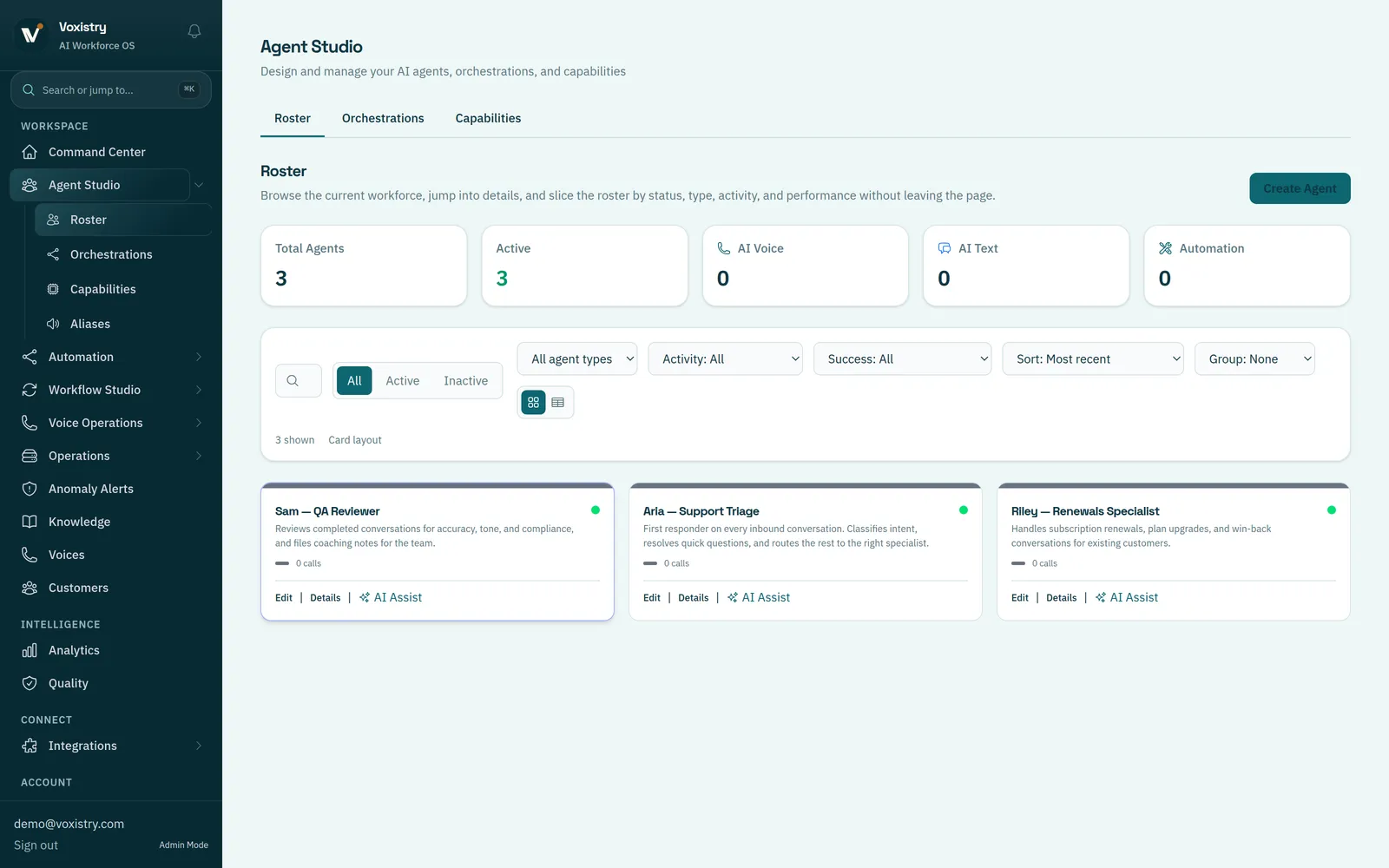
Use Voxistry’s Agent Studio to define each AI role, connect business knowledge and choose permitted tools. Start with an employee assistant, a customer service specialist or an operations coordinator.
AGENT STUDIO
Turn a business role into an AI specialist.
Define what the agent should do, what information it can use and which tools it may call. Review its configuration, then test a focused task with your team.
IN THIS DEMOThree specialist roles handle support triage, renewals and quality review.
How you use Agent Studio
- Define the role
- Describe the job, the expected result and the requests that need a person.
- Connect knowledge
- Add the relevant business information and select the tools this role needs.
- Set the boundaries
- Specify permitted actions and when the agent should hand work to your team.
SPOTLIGHT / YOUR WORK IN PRACTICE
Less chasing.
A clearer next step.
From customer enquiries to employee support and operational decisions, start with a process your team knows well. Connect the information, AI roles and people it needs.
ONE WORKFLOW TO EXPLORE
Help customers without making them start over.
An agent gathers the facts and prepares an answer. When an issue needs a person, your team receives the context already collected.

Available actions depend on the tools and permissions configured for the workflow.
Shape your workflowSee the AI role and human handoffs
- 01 / THE REQUEST
A customer needs help
“Can you check what’s happening with my order?”
- 02 / THE AI ROLE
Gather the context
Check the available records and prepare a response using your business information.
- 03 / THE HUMAN DECISION
Resolve the exception
An unresolved issue goes to the responsible person, with the details attached.
- 04 / THE NEXT ACTION
Keep the case clear
Record the answer or open issue, the next action and who owns it.
FROM THE EXAMPLE TO YOUR WORK
What should your
first workflow cover?
Choose the requests, business information and human decisions you want to explore. It’s fine to leave a choice for discussion.
A USEFUL STARTING POINT
Start by mapping the process.
Confirm the requests, business information and human owner before choosing which AI role to test.
0 of 3 choices selected
Selections help frame a discussion. Tool access and available actions are confirmed for your deployment.
YOUR RULES. YOUR RESPONSIBILITY.
Let AI do the legwork.
Keep the decisions
that need your team.
Choose what an agent can access, which actions it may take and where a person needs to review the work.
- 01
Define the boundaries
Give each role the knowledge and tools it needs for its job.
- 02
Make approval a step
Place human review where an action or commitment needs authorization.
- 03
Keep the handoff useful
Carry the request, collected details and next action to the person responsible.

The agent gathers the request and account details for the account owner.
Review the commitment.
The account owner decides what can be offered and authorizes the next action.
Decision · Next action · Responsible person
A workflow illustration, not a live customer record.
START SMALL. LEARN FROM THE WORK.
One process.
A practical first step.
You don’t need to redesign your whole business to explore AI. Start with a repeatable job and agree what a useful result looks like.
- 01
Choose the job
Bring a recurring request, the people involved and the outcome you want to improve.
A clear scope - 02

Define how it should work
Identify the knowledge, connected systems, permitted actions and points for human review.
A testable workflow - 03
Test, review, then expand
Try realistic cases, inspect the results and resolve gaps before widening the scope.
Evidence for the next decision
A LITTLE MORE CLARITY
Good questions.
Clear answers.
Start with what the platform does, how your team stays involved and what you need to get going.
Your First AI Agent: A 30-Day Pilot Playbook
Read the guideWhat is an agentic AI workforce?
It is a group of AI agents with defined business roles, connected through a shared process. “Agentic” means they can use information and permitted tools to work through steps toward a task, beyond answering a single question. Your team defines their scope, access, approvals and handoffs.
How does Voxistry support business decisions?
Agents can gather relevant information from connected sources, prepare a summary and identify the next action in a defined process. Your team sets which actions AI may take and which decisions need human review. The useful starting point is a specific question, the data needed to answer it and an owner for the result.
What is the difference between an agent, a team and a workflow?
An agent performs a defined job. A team coordinates specialist agents. A workflow defines the sequence of tasks, decisions and handoffs, including where people take part.
Can it work with the systems we already use?
The right connections depend on your workflow and the access those systems provide. Bring your systems list to the demo so we can check the available integrations, permissions and any setup required.
When does a person take over?
Define review and handoff points around your process. For example, an agent can gather details while a team member reviews an exception or authorizes a commitment. These rules should be tested with realistic cases before rollout.
What should we bring to a demo?
One process you want to improve, a few example requests and a list of the systems involved. We can then discuss the AI role, the human decisions and what a useful first workflow would look like.
MAKE IT CONCRETE
Bring us a workflow.
Let’s put AI to work.
Explore how Voxistry could connect your data, systems and people to improve a process—from supporting employees to coordinating operations.
Tell us what you want to improve.
We’ll follow up to arrange a conversation.